01 / Listen
One glance, then back to your thought.
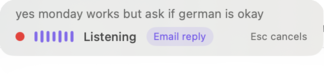
The compact HUD confirms that RoughSay is listening, shows the active preset, and keeps the cancel shortcut within sight. Nothing more competes for attention.
AI dictation and voice-to-text for macOS
Hold a key and speak the thought exactly as it arrives - rambling, half-finished, and multilingual. Turn it into polished writing with AI, or keep the entire transcription on your Mac.
You said
“ugh, tell them the report will be late because I forgot it existed… no wait, don't say that - something about final quality checks. They'll have it Thursday.”
Ready to send
Not dictation
Dictation faithfully types every detour. RoughSay listens for the part you actually mean, then shapes it for the person and place you are writing to.
How it works
One shortcut in. A message you would actually send out.
Speak like you think: filler words, corrections, mixed languages, and all. The discreet HUD confirms RoughSay is listening.
Choose Cloud + polish, keep microphone audio local with On-device + polish, or use Private on-device so no dictation content is sent to OpenAI.
Paste directly into Slack, Gmail, LinkedIn, WhatsApp Web, a terminal, or anywhere else you type. Your clipboard is restored afterwards.
The real app
A small status bar while you speak. A focused preview when you want the final say.
The compact HUD confirms that RoughSay is listening, shows the active preset, and keeps the cancel shortcut within sight. Nothing more competes for attention.
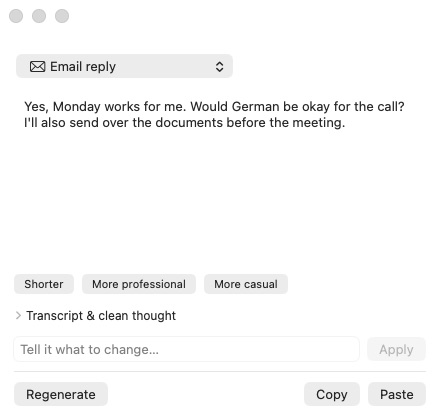
Preview the result, edit it directly, refine its tone, regenerate, copy, or paste - without leaving the app you were working in. Or trust RoughSay and skip the preview entirely.
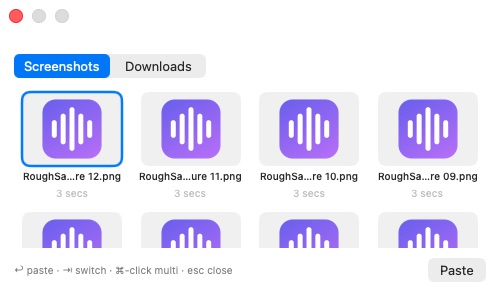
Press ⇧⌥ Space anywhere and hit ↩. Your latest screenshot or download lands in the conversation without a trip through Finder.
Hello! Could we move the meeting to Thursday? Thank you.
Select text in Mail, Slack, a browser, or another app and press your shortcut. RoughSay detects the language and translates it on-device into English, German, Polish, French, or Spanish. It opens a focused copy-only popup, and your selected text never goes to RoughSay's relay or OpenAI.
Built around your work
RoughSay adapts to the surface, language, and text already in front of you.
Create presets for email, chat, notes, or coding prompts. App and website triggers choose the right structure automatically, including your sign-off. Select or copy the message you received and RoughSay can answer its real names, questions, and dates.
Speak English, German, Polish, French, Spanish, or mix them in one breath. The finished message comes out naturally in the language you choose, including formal or informal German. A personal dictionary and smart replacements keep names, jargon, addresses, links, and product spellings exact.
Explore multilingual dictationPrivate on-device mode uses multilingual Parakeet locally, applies your text replacements, and delivers the raw transcript. It does not call OpenAI, read reply context, or send dictation content - even when your Mac is online. Preview, direct paste, Auto delivery, Apple Notes, offline use, and explicit on-device Translate Selection still work.
Explore private dictationSelect text and say what should change: shorter, friendlier, translated, reorganized, or more specific. Capture a cleaned-up thought straight to Apple Notes, or use the recent-file picker to attach what you are talking about. A separate shortcut translates selected text on-device and opens a copy popup, restoring your previous clipboard after compatibility capture when needed. Polished modes can use fast cloud streaming or on-device transcription in English, German, Polish, French, and Spanish while keeping microphone audio local.
Explore AI voice typingClear by design
RoughSay has no website analytics and its relay does not log or persist your audio, transcripts, selected text, prompts, or generated output.
Read the full privacy detailsAnywhere you can type: native apps and browsers alike, including Slack, Gmail, LinkedIn, WhatsApp Web, Linear, Notion, and iTerm. Supported apps and sites can choose presets automatically; everything else uses your default.
English, German, Polish, French, and Spanish are first-class - including formal and informal German and per-language sign-offs. You can speak a mix and choose one clean output language.
The beta is free and available in small, invite-only batches. Launch pricing will be fair and simple, and beta users get founder terms.
Yes. Private on-device mode transcribes locally and delivers the raw transcript after local text replacements. It never calls OpenAI or reads reply context, whether or not you are online. Translate Selection reads only text you explicitly select and processes it on-device. Setup verifies your beta invite once and downloads the roughly 500 MB transcription model from Hugging Face once; with both stored on your Mac, private dictation works offline.
Cloud + polish sends audio and text to OpenAI through RoughSay's relay. On-device + polish keeps audio local but sends the transcript and optional context to OpenAI. Private on-device sends no dictation content to OpenAI, and Translate Selection stays on-device in every mode. Full browser URLs, local app matching, and local usage counts stay on your Mac.
macOS 15 or newer for now. An iPhone sister app is on the roadmap.
Private beta
Join the beta. First invites go out in small batches.